ECS, EC2 + CodeDeploy, EKS + Argo CD는 무엇이 다른가 — 배포 단위와 배포 방식으로 비교


AWS에서 Spring Boot 서버 하나를 배포한다고 해 보겠습니다. 팀에 따라 "EC2에 CodeDeploy로 올린다", "ECS로 올린다", "EKS에 Argo CD로 올린다"처럼 서로 다른 답이 나옵니다. 세 방식 모두 결과적으로는 새 버전이 서버에서 실행되지만, 무엇을 배포하는지, 누가 실행 개수를 유지하는지, 누가 배포를 시작하는지가 다릅니다. 이 글은 같은 주문 API(order-api)를 세 방식으로 배포한다고 가정하고 차이를 비교합니다.
한눈에 보는 세 방식
SVG 코드
<svg xmlns="http://www.w3.org/2000/svg" width="440" height="290" viewBox="0 0 440 290" font-family="-apple-system, 'Segoe UI', 'Noto Sans KR', sans-serif">
<defs><marker id="ah" viewBox="0 0 10 10" refX="9" refY="5" markerWidth="7" markerHeight="7" orient="auto-start-reverse"><path d="M0,0 L10,5 L0,10 z" fill="#888"/></marker></defs>
<rect x="0" y="0" width="440" height="290" fill="#FFFFFF"/>
<text x="220" y="22" font-size="13" fill="#333" text-anchor="middle" font-weight="bold">같은 앱을 배포하는 세 가지 방식</text>
<rect x="76" y="40" width="116" height="34" rx="6" fill="#FFF3E0" stroke="#E8C98F"/>
<text x="134.0" y="62" font-size="11.5" fill="#7A5200" text-anchor="middle" font-weight="bold">EC2 + CodeDeploy</text>
<rect x="196" y="40" width="116" height="34" rx="6" fill="#EEF3FB" stroke="#4C7FE0"/>
<text x="254.0" y="62" font-size="11.5" fill="#26508F" text-anchor="middle" font-weight="bold">ECS</text>
<rect x="316" y="40" width="116" height="34" rx="6" fill="#FCE4EC" stroke="#D06A86"/>
<text x="374.0" y="62" font-size="11.5" fill="#9E3A57" text-anchor="middle" font-weight="bold">EKS + Argo CD</text>
<rect x="8" y="82" width="64" height="46" rx="4" fill="#F7F7F7" stroke="#DDDDDD"/>
<text x="40" y="109" font-size="10.5" fill="#555" text-anchor="middle" font-weight="bold">배포 단위</text>
<rect x="76" y="82" width="116" height="46" rx="4" fill="#FFFFFF" stroke="#E8C98F"/>
<text x="134.0" y="102" font-size="10.5" fill="#333" text-anchor="middle">jar와 스크립트</text>
<text x="134.0" y="117" font-size="10.5" fill="#333" text-anchor="middle">(번들 zip)</text>
<rect x="196" y="82" width="116" height="46" rx="4" fill="#FFFFFF" stroke="#4C7FE0"/>
<text x="254.0" y="102" font-size="10.5" fill="#333" text-anchor="middle">컨테이너</text>
<text x="254.0" y="117" font-size="10.5" fill="#333" text-anchor="middle">이미지</text>
<rect x="316" y="82" width="116" height="46" rx="4" fill="#FFFFFF" stroke="#D06A86"/>
<text x="374.0" y="102" font-size="10.5" fill="#333" text-anchor="middle">이미지와</text>
<text x="374.0" y="117" font-size="10.5" fill="#333" text-anchor="middle">매니페스트</text>
<rect x="8" y="132" width="64" height="46" rx="4" fill="#F7F7F7" stroke="#DDDDDD"/>
<text x="40" y="159" font-size="10.5" fill="#555" text-anchor="middle" font-weight="bold">개수 유지</text>
<rect x="76" y="132" width="116" height="46" rx="4" fill="#FFFFFF" stroke="#E8C98F"/>
<text x="134.0" y="152" font-size="10.5" fill="#333" text-anchor="middle">Auto Scaling</text>
<text x="134.0" y="167" font-size="10.5" fill="#333" text-anchor="middle">그룹(서버 수)</text>
<rect x="196" y="132" width="116" height="46" rx="4" fill="#FFFFFF" stroke="#4C7FE0"/>
<text x="254.0" y="152" font-size="10.5" fill="#333" text-anchor="middle">ECS 서비스</text>
<text x="254.0" y="167" font-size="10.5" fill="#333" text-anchor="middle">(태스크 수)</text>
<rect x="316" y="132" width="116" height="46" rx="4" fill="#FFFFFF" stroke="#D06A86"/>
<text x="374.0" y="152" font-size="10.5" fill="#333" text-anchor="middle">Deployment</text>
<text x="374.0" y="167" font-size="10.5" fill="#333" text-anchor="middle">(파드 수)</text>
<rect x="8" y="182" width="64" height="46" rx="4" fill="#F7F7F7" stroke="#DDDDDD"/>
<text x="40" y="209" font-size="10.5" fill="#555" text-anchor="middle" font-weight="bold">배포 시작</text>
<rect x="76" y="182" width="116" height="46" rx="4" fill="#FFFFFF" stroke="#E8C98F"/>
<text x="134.0" y="202" font-size="10.5" fill="#333" text-anchor="middle">CI가 CodeDeploy</text>
<text x="134.0" y="217" font-size="10.5" fill="#333" text-anchor="middle">배포를 요청</text>
<rect x="196" y="182" width="116" height="46" rx="4" fill="#FFFFFF" stroke="#4C7FE0"/>
<text x="254.0" y="202" font-size="10.5" fill="#333" text-anchor="middle">CI가 서비스</text>
<text x="254.0" y="217" font-size="10.5" fill="#333" text-anchor="middle">갱신을 요청</text>
<rect x="316" y="182" width="116" height="46" rx="4" fill="#FFFFFF" stroke="#D06A86"/>
<text x="374.0" y="202" font-size="10.5" fill="#333" text-anchor="middle">CI는 Git에 커밋</text>
<text x="374.0" y="217" font-size="10.5" fill="#333" text-anchor="middle">Argo CD가 반영</text>
<rect x="8" y="232" width="64" height="46" rx="4" fill="#F7F7F7" stroke="#DDDDDD"/>
<text x="40" y="259" font-size="10.5" fill="#555" text-anchor="middle" font-weight="bold">서버 관리</text>
<rect x="76" y="232" width="116" height="46" rx="4" fill="#FFFFFF" stroke="#E8C98F"/>
<text x="134.0" y="252" font-size="10.5" fill="#333" text-anchor="middle">OS, JDK까지</text>
<text x="134.0" y="267" font-size="10.5" fill="#333" text-anchor="middle">직접 관리</text>
<rect x="196" y="232" width="116" height="46" rx="4" fill="#FFFFFF" stroke="#4C7FE0"/>
<text x="254.0" y="252" font-size="10.5" fill="#333" text-anchor="middle">Fargate면</text>
<text x="254.0" y="267" font-size="10.5" fill="#333" text-anchor="middle">서버 관리 없음</text>
<rect x="316" y="232" width="116" height="46" rx="4" fill="#FFFFFF" stroke="#D06A86"/>
<text x="374.0" y="252" font-size="10.5" fill="#333" text-anchor="middle">노드 방식에</text>
<text x="374.0" y="267" font-size="10.5" fill="#333" text-anchor="middle">따라 다름</text>
</svg>
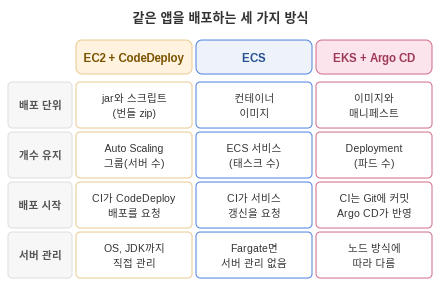
- 배포 단위: EC2 + CodeDeploy는 jar 파일과 설치 스크립트를 zip 파일 하나로 만든 번들을 배포합니다. ECS와 EKS는 애플리케이션과 실행 환경(JDK, 라이브러리)을 함께 넣은 컨테이너 이미지를 배포합니다.
- 개수 유지: 서버나 컨테이너가 한 대 종료됐을 때 새로 기동해 개수를 유지하는 주체입니다. EC2는 Auto Scaling 그룹이 서버 수를, ECS는 서비스가 태스크 수를, 쿠버네티스는 Deployment가 파드 수를 유지합니다.
- 배포 시작: CodeDeploy와 ECS는 CI가 AWS API를 호출해 배포를 시작합니다. Argo CD를 사용하면 CI는 Git에 커밋만 하고, 클러스터 안의 Argo CD가 변경을 반영합니다.
- 서버 관리: EC2는 OS 패치와 JDK 설치까지 직접 합니다. ECS를 Fargate로 실행하면 관리할 서버가 없습니다.
먼저 용어 세 가지를 정리하고 각 방식을 살펴봅니다.
- 컨테이너 이미지: 애플리케이션과 실행에 필요한 파일을 한 파일로 만든 것입니다. 이미지는 ECR(Elastic Container Registry) 같은 이미지 저장소에 올려 두고, 서버가 내려받아 실행합니다.
- 오케스트레이터: 컨테이너를 어느 서버에서 몇 개 실행할지 정하고, 종료된 컨테이너를 다시 기동하는 시스템입니다. ECS와 쿠버네티스가 여기에 해당합니다.
- CD(지속적 배포) 도구: 빌드된 결과물을 실행 환경에 반영하는 도구입니다. CodeDeploy와 Argo CD가 여기에 해당합니다.
EC2 + CodeDeploy — 서버에 새 버전을 설치하는 방식
EC2(Elastic Compute Cloud) 는 AWS의 가상 서버이고, CodeDeploy는 서버에 애플리케이션 파일을 설치하는 배포 서비스입니다. 구성 요소는 다음과 같습니다.
- 애플리케이션과 배포 그룹: CodeDeploy에 "어떤 앱을 어떤 서버 그룹에 배포할지"를 등록합니다. 배포 그룹은 태그나 Auto Scaling 그룹으로 대상 서버를 지정합니다.
- 리비전(revision): 배포할 번들입니다. jar 파일, 스크립트,
appspec.yml을 zip으로 만들어 S3, GitHub, Bitbucket 중 한 곳에 업로드합니다. - CodeDeploy 에이전트: 각 EC2 서버에 설치하는 프로그램입니다. 배포가 시작되면 에이전트가 번들을 내려받고 스크립트를 실행합니다. 에이전트 문서에 다음과 같이 있습니다.
The CodeDeploy agent is required only if you deploy to an EC2/On-Premises compute platform.
즉 에이전트는 서버에 직접 설치하는 배포에만 필요하고, 뒤에서 볼 ECS 배포에는 필요하지 않습니다.
appspec.yml — 어떤 파일을 어디에 복사하고 언제 무엇을 실행할지
appspec.yml은 번들 안에 넣는 배포 명세입니다. 파일을 복사할 위치와, 배포 단계마다 실행할 스크립트를 적습니다.
version: 0.0
os: linux
files:
  - source: order-api.jar
    destination: /opt/order-api
hooks:
  ApplicationStop:
    - location: scripts/stop.sh        # 기존 프로세스 종료
      timeout: 60
  AfterInstall:
    - location: scripts/configure.sh   # 권한, 설정 파일 변경
  ApplicationStart:
    - location: scripts/start.sh       # systemctl start order-api
  ValidateService:
    - location: scripts/health.sh      # /actuator/health가 UP인지 확인
      timeout: 120
hooks의 이름은 CodeDeploy가 정한 수명 주기 이벤트입니다. 배포 그룹이 로드 밸런서를 사용하면, 서버 한 대에서 아래 순서로 진행됩니다.
SVG 코드
<svg xmlns="http://www.w3.org/2000/svg" width="440" height="470" viewBox="0 0 440 470" font-family="-apple-system, 'Segoe UI', 'Noto Sans KR', sans-serif">
<defs><marker id="ah" viewBox="0 0 10 10" refX="9" refY="5" markerWidth="7" markerHeight="7" orient="auto-start-reverse"><path d="M0,0 L10,5 L0,10 z" fill="#888"/></marker></defs>
<rect x="0" y="0" width="440" height="470" fill="#FFFFFF"/>
<text x="220" y="22" font-size="13" fill="#333" text-anchor="middle" font-weight="bold">CodeDeploy 인플레이스 배포의 수명 주기 이벤트</text>
<text x="220" y="40" font-size="10" fill="#888" text-anchor="middle">(로드 밸런서를 사용하는 배포 그룹, 서버 한 대 기준)</text>
<rect x="12" y="54" width="84" height="74" rx="6" fill="#FCE4EC" stroke="#D06A86"/>
<text x="54" y="95.0" font-size="11" fill="#9E3A57" text-anchor="middle" font-weight="bold">트래픽 차단</text>
<rect x="106" y="54" width="190" height="22" rx="4" fill="#FFFFFF" stroke="#D06A86"/>
<text x="201" y="69" font-size="10.5" fill="#333" text-anchor="middle">BeforeBlockTraffic</text>
<rect x="106" y="80" width="190" height="22" rx="4" fill="#EEEEEE" stroke="#BBBBBB" stroke-dasharray="4 3"/>
<text x="201" y="95" font-size="10.5" fill="#777" text-anchor="middle">BlockTraffic</text>
<text x="306" y="95" font-size="10" fill="#555" text-anchor="start">타깃 그룹에서 제외</text>
<rect x="106" y="106" width="190" height="22" rx="4" fill="#FFFFFF" stroke="#D06A86"/>
<text x="201" y="121" font-size="10.5" fill="#333" text-anchor="middle">AfterBlockTraffic</text>
<rect x="12" y="142" width="84" height="178" rx="6" fill="#FFF3E0" stroke="#E8C98F"/>
<text x="54" y="235.0" font-size="11" fill="#7A5200" text-anchor="middle" font-weight="bold">설치</text>
<rect x="106" y="142" width="190" height="22" rx="4" fill="#FFFFFF" stroke="#E8C98F"/>
<text x="201" y="157" font-size="10.5" fill="#333" text-anchor="middle">ApplicationStop</text>
<text x="306" y="157" font-size="10" fill="#555" text-anchor="start">기존 앱 종료</text>
<rect x="106" y="168" width="190" height="22" rx="4" fill="#EEEEEE" stroke="#BBBBBB" stroke-dasharray="4 3"/>
<text x="201" y="183" font-size="10.5" fill="#777" text-anchor="middle">DownloadBundle</text>
<text x="306" y="183" font-size="10" fill="#555" text-anchor="start">번들 내려받기</text>
<rect x="106" y="194" width="190" height="22" rx="4" fill="#FFFFFF" stroke="#E8C98F"/>
<text x="201" y="209" font-size="10.5" fill="#333" text-anchor="middle">BeforeInstall</text>
<text x="306" y="209" font-size="10" fill="#555" text-anchor="start">이전 파일 정리</text>
<rect x="106" y="220" width="190" height="22" rx="4" fill="#EEEEEE" stroke="#BBBBBB" stroke-dasharray="4 3"/>
<text x="201" y="235" font-size="10.5" fill="#777" text-anchor="middle">Install</text>
<text x="306" y="235" font-size="10" fill="#555" text-anchor="start">파일 복사</text>
<rect x="106" y="246" width="190" height="22" rx="4" fill="#FFFFFF" stroke="#E8C98F"/>
<text x="201" y="261" font-size="10.5" fill="#333" text-anchor="middle">AfterInstall</text>
<text x="306" y="261" font-size="10" fill="#555" text-anchor="start">권한, 설정 변경</text>
<rect x="106" y="272" width="190" height="22" rx="4" fill="#FFFFFF" stroke="#E8C98F"/>
<text x="201" y="287" font-size="10.5" fill="#333" text-anchor="middle">ApplicationStart</text>
<text x="306" y="287" font-size="10" fill="#555" text-anchor="start">새 앱 기동</text>
<rect x="106" y="298" width="190" height="22" rx="4" fill="#FFFFFF" stroke="#E8C98F"/>
<text x="201" y="313" font-size="10.5" fill="#333" text-anchor="middle">ValidateService</text>
<text x="306" y="313" font-size="10" fill="#555" text-anchor="start">헬스 체크</text>
<rect x="12" y="334" width="84" height="74" rx="6" fill="#E9F2E9" stroke="#8FBF8F"/>
<text x="54" y="375.0" font-size="11" fill="#2E6B2E" text-anchor="middle" font-weight="bold">트래픽 허용</text>
<rect x="106" y="334" width="190" height="22" rx="4" fill="#FFFFFF" stroke="#8FBF8F"/>
<text x="201" y="349" font-size="10.5" fill="#333" text-anchor="middle">BeforeAllowTraffic</text>
<rect x="106" y="360" width="190" height="22" rx="4" fill="#EEEEEE" stroke="#BBBBBB" stroke-dasharray="4 3"/>
<text x="201" y="375" font-size="10.5" fill="#777" text-anchor="middle">AllowTraffic</text>
<text x="306" y="375" font-size="10" fill="#555" text-anchor="start">타깃 그룹에 등록</text>
<rect x="106" y="386" width="190" height="22" rx="4" fill="#FFFFFF" stroke="#8FBF8F"/>
<text x="201" y="401" font-size="10.5" fill="#333" text-anchor="middle">AfterAllowTraffic</text>
<rect x="106" y="426" width="22" height="14" rx="3" fill="#FFFFFF" stroke="#888"/>
<text x="134" y="437" font-size="10" fill="#555" text-anchor="start">appspec.yml에 스크립트를 넣는 이벤트</text>
<rect x="106" y="448" width="22" height="14" rx="3" fill="#EEEEEE" stroke="#BBBBBB" stroke-dasharray="4 3"/>
<text x="134" y="459" font-size="10" fill="#555" text-anchor="start">CodeDeploy가 처리(스크립트 불가)</text>
</svg>
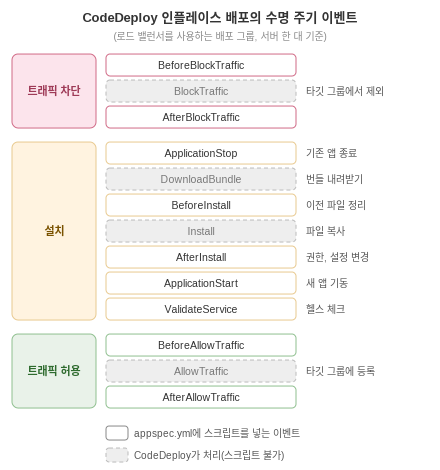
- 트래픽 차단: 로드 밸런서의 타깃 그룹에서 서버를 빼서 요청이 들어오지 않게 합니다.
- 설치: 기존 앱을 종료하고, 번들을 내려받아 파일을 복사한 뒤 새 앱을 기동하고 헬스 체크를 합니다.
- 트래픽 허용: 서버를 타깃 그룹에 다시 등록합니다.
회색 점선 이벤트(DownloadBundle, Install, BlockTraffic, AllowTraffic)에는 스크립트를 넣을 수 없습니다. 수명 주기 이벤트 문서에 다음과 같이 있습니다.
This event is reserved for the CodeDeploy agent and cannot be used to run scripts.
즉 파일을 내려받고 복사하는 일은 에이전트가 하고, 사용자는 그 앞뒤에 실행할 스크립트만 정합니다.
몇 대씩 배포할지 — 배포 구성
서버가 4대라면 한 번에 몇 대씩 위 과정을 거칠지를 배포 구성으로 정합니다. 배포 구성 문서의 기본 구성은 세 가지입니다.
| 배포 구성 | 동작 | 서버 4대일 때 |
|---|---|---|
CodeDeployDefault.OneAtATime | 한 번에 한 대씩 배포합니다 | 3대가 계속 요청을 처리합니다 |
CodeDeployDefault.HalfAtATime | 최대 절반씩 배포합니다 | 2대씩 두 번에 나눠 배포합니다 |
CodeDeployDefault.AllAtOnce | 가능한 한 많은 서버에 한 번에 배포합니다 | 배포하는 동안 처리할 서버가 없을 수 있습니다 |
인플레이스와 블루/그린
지금까지 본 방식은 기존 서버에 새 버전을 그대로 설치하는 인플레이스(in-place) 배포입니다. CodeDeploy는 블루/그린 배포도 지원합니다.
- 인플레이스: 기존 서버를 그대로 사용하고 앱만 교체합니다. 서버를 새로 만들지 않아 빠르지만, 배포 중에는 처리할 수 있는 서버 수가 줄어듭니다.
- 블루/그린: 기존 Auto Scaling 그룹을 복사해 새 서버(그린)를 만들고, 새 버전을 설치한 뒤 로드 밸런서의 트래픽을 새 서버로 옮깁니다. 기존 서버(블루)는 종료하거나 남겨 둘 수 있어서, 문제가 생기면 트래픽을 다시 블루로 전환하면 됩니다.
이 방식이 맞는 경우와 부담
- 맞는 경우: 컨테이너로 옮기지 않은 기존 서비스, 서버에 설치된 소프트웨어(에이전트, 라이선스 프로그램)에 의존하는 서비스입니다.
- 부담: OS 패치, JDK 업그레이드, 에이전트 설치를 팀이 직접 합니다. 서버마다 설치 이력이 쌓여서 서버 간 환경이 달라지기 쉽고, 새 서버를 만들 때는 AMI(서버 이미지)를 따로 관리해야 합니다.
ECS — 컨테이너를 정해진 개수만큼 유지하는 방식
ECS(Elastic Container Service) 는 AWS가 만든 컨테이너 오케스트레이터입니다. ECS에서는 서버에 파일을 설치하지 않고, 이미지를 지정해 컨테이너를 몇 개 실행할지를 선언합니다.
- 클러스터: 태스크가 실행되는 공간입니다.
- 태스크 정의(task definition): 실행 설계도입니다. 이미지, CPU와 메모리, 포트, 환경 변수를 적고, 고칠 때마다 새 리비전(
order-api:12,order-api:13)이 생깁니다. - 태스크(task): 태스크 정의로 실행한 컨테이너(들)입니다.
- 서비스(service): 태스크를 원하는 개수만큼 계속 실행합니다. 서비스 문서에 다음과 같이 있습니다.
The service scheduler also replaces tasks determined to be unhealthy after a container health check or a load balancer target group health check fails.
즉 태스크가 헬스 체크에 실패하면 서비스가 그 태스크를 새 태스크로 교체합니다. 서비스는 로드 밸런서의 타깃 그룹에 태스크를 등록하고 해제하는 일도 합니다.
태스크 정의는 JSON으로 작성합니다. 아래는 핵심 항목만 남긴 예시입니다.
{
  "family": "order-api",
  "cpu": "512",
  "memory": "1024",
  "requiresCompatibilities": ["FARGATE"],
  "containerDefinitions": [
    {
      "name": "order-api",
      "image": "123456789012.dkr.ecr.ap-northeast-2.amazonaws.com/order-api:1.4.0",
      "portMappings": [{ "containerPort": 8080 }],
      "environment": [{ "name": "SPRING_PROFILES_ACTIVE", "value": "prod" }]
    }
  ]
}
태스크가 실행되는 곳 — Fargate, EC2, Managed Instances
ECS는 태스크를 어디서 실행할지(용량 옵션)를 선택할 수 있습니다.
| 용량 옵션 | 서버 관리 | 맞는 경우 |
|---|---|---|
| Fargate | 서버가 보이지 않습니다. 태스크가 요청한 vCPU와 메모리만큼 과금됩니다 | 서버 관리 없이 운영하려는 대부분의 웹 서비스 |
| EC2 | 클러스터에 등록한 EC2 서버를 팀이 관리합니다 | GPU, 특정 인스턴스 타입, 서버 단위 할인을 써야 할 때 |
| Managed Instances | EC2 인스턴스를 쓰되 패치와 교체를 AWS가 관리합니다 | EC2 인스턴스 타입이 필요하지만 서버 관리는 줄이려 할 때 |
| ECS Anywhere | 온프레미스 서버를 등록해 사용합니다 | 자체 데이터센터의 서버도 같은 방식으로 운영할 때 |
Fargate 요금은 Fargate 요금 페이지에 따르면 초 단위로 계산되고 최소 1분이 청구됩니다. 태스크를 자주 실행하고 종료하는 배치에서도 실행한 시간만큼만 내면 됩니다.
롤링 업데이트 — 최소와 최대 비율
새 버전을 배포하려면 새 태스크 정의 리비전을 만들고 서비스를 갱신합니다. 기본 방식은 롤링 업데이트이고, 두 값으로 동시에 실행할 태스크 수를 정합니다. DeploymentConfiguration API 문서에 기본값이 있습니다.
The default value for a replica service for
minimumHealthyPercentis 100%.
The default
maximumPercentvalue for a service using theREPLICAservice scheduler is 200%.
즉 기본값에서는 정상 태스크 수가 원하는 개수 아래로 내려가지 않고, 배포 중에는 원하는 개수의 두 배까지 태스크를 실행할 수 있습니다. 원하는 개수가 4라면 다음 순서로 진행됩니다.
SVG 코드
<svg xmlns="http://www.w3.org/2000/svg" width="440" height="356" viewBox="0 0 440 356" font-family="-apple-system, 'Segoe UI', 'Noto Sans KR', sans-serif">
<defs><marker id="ah" viewBox="0 0 10 10" refX="9" refY="5" markerWidth="7" markerHeight="7" orient="auto-start-reverse"><path d="M0,0 L10,5 L0,10 z" fill="#888"/></marker></defs>
<rect x="0" y="0" width="440" height="356" fill="#FFFFFF"/>
<text x="220" y="22" font-size="12.5" fill="#333" text-anchor="middle" font-weight="bold">ECS 롤링 업데이트 — 원하는 개수 4, 최소 100%, 최대 200%</text>
<text x="16" y="50" font-size="11" fill="#333" text-anchor="start">① 기존 v1 태스크 4개가 실행 중</text>
<rect x="20" y="60" width="45" height="32" rx="5" fill="#EEF3FB" stroke="#4C7FE0"/>
<text x="42.5" y="80" font-size="11" fill="#26508F" text-anchor="middle" font-weight="bold">v1</text>
<rect x="71" y="60" width="45" height="32" rx="5" fill="#EEF3FB" stroke="#4C7FE0"/>
<text x="93.5" y="80" font-size="11" fill="#26508F" text-anchor="middle" font-weight="bold">v1</text>
<rect x="122" y="60" width="45" height="32" rx="5" fill="#EEF3FB" stroke="#4C7FE0"/>
<text x="144.5" y="80" font-size="11" fill="#26508F" text-anchor="middle" font-weight="bold">v1</text>
<rect x="173" y="60" width="45" height="32" rx="5" fill="#EEF3FB" stroke="#4C7FE0"/>
<text x="195.5" y="80" font-size="11" fill="#26508F" text-anchor="middle" font-weight="bold">v1</text>
<text x="16" y="120" font-size="11" fill="#333" text-anchor="start">② v2 태스크 4개를 추가로 기동(최대 200% = 8개)</text>
<rect x="20" y="130" width="45" height="32" rx="5" fill="#EEF3FB" stroke="#4C7FE0"/>
<text x="42.5" y="150" font-size="11" fill="#26508F" text-anchor="middle" font-weight="bold">v1</text>
<rect x="71" y="130" width="45" height="32" rx="5" fill="#EEF3FB" stroke="#4C7FE0"/>
<text x="93.5" y="150" font-size="11" fill="#26508F" text-anchor="middle" font-weight="bold">v1</text>
<rect x="122" y="130" width="45" height="32" rx="5" fill="#EEF3FB" stroke="#4C7FE0"/>
<text x="144.5" y="150" font-size="11" fill="#26508F" text-anchor="middle" font-weight="bold">v1</text>
<rect x="173" y="130" width="45" height="32" rx="5" fill="#EEF3FB" stroke="#4C7FE0"/>
<text x="195.5" y="150" font-size="11" fill="#26508F" text-anchor="middle" font-weight="bold">v1</text>
<rect x="224" y="130" width="45" height="32" rx="5" fill="#FFFFFF" stroke="#8FBF8F" stroke-dasharray="4 3"/>
<text x="246.5" y="150" font-size="11" fill="#2E6B2E" text-anchor="middle" font-weight="bold">v2</text>
<rect x="275" y="130" width="45" height="32" rx="5" fill="#FFFFFF" stroke="#8FBF8F" stroke-dasharray="4 3"/>
<text x="297.5" y="150" font-size="11" fill="#2E6B2E" text-anchor="middle" font-weight="bold">v2</text>
<rect x="326" y="130" width="45" height="32" rx="5" fill="#FFFFFF" stroke="#8FBF8F" stroke-dasharray="4 3"/>
<text x="348.5" y="150" font-size="11" fill="#2E6B2E" text-anchor="middle" font-weight="bold">v2</text>
<rect x="377" y="130" width="45" height="32" rx="5" fill="#FFFFFF" stroke="#8FBF8F" stroke-dasharray="4 3"/>
<text x="399.5" y="150" font-size="11" fill="#2E6B2E" text-anchor="middle" font-weight="bold">v2</text>
<text x="16" y="190" font-size="11" fill="#333" text-anchor="start">③ v2가 헬스 체크를 통과하면 v1 4개를 중지</text>
<rect x="20" y="200" width="45" height="32" rx="5" fill="#F7F7F7" stroke="#BBBBBB" stroke-dasharray="4 3"/>
<text x="42.5" y="220" font-size="10.5" fill="#999" text-anchor="middle">중지</text>
<rect x="71" y="200" width="45" height="32" rx="5" fill="#F7F7F7" stroke="#BBBBBB" stroke-dasharray="4 3"/>
<text x="93.5" y="220" font-size="10.5" fill="#999" text-anchor="middle">중지</text>
<rect x="122" y="200" width="45" height="32" rx="5" fill="#F7F7F7" stroke="#BBBBBB" stroke-dasharray="4 3"/>
<text x="144.5" y="220" font-size="10.5" fill="#999" text-anchor="middle">중지</text>
<rect x="173" y="200" width="45" height="32" rx="5" fill="#F7F7F7" stroke="#BBBBBB" stroke-dasharray="4 3"/>
<text x="195.5" y="220" font-size="10.5" fill="#999" text-anchor="middle">중지</text>
<rect x="224" y="200" width="45" height="32" rx="5" fill="#E9F2E9" stroke="#8FBF8F"/>
<text x="246.5" y="220" font-size="11" fill="#2E6B2E" text-anchor="middle" font-weight="bold">v2</text>
<rect x="275" y="200" width="45" height="32" rx="5" fill="#E9F2E9" stroke="#8FBF8F"/>
<text x="297.5" y="220" font-size="11" fill="#2E6B2E" text-anchor="middle" font-weight="bold">v2</text>
<rect x="326" y="200" width="45" height="32" rx="5" fill="#E9F2E9" stroke="#8FBF8F"/>
<text x="348.5" y="220" font-size="11" fill="#2E6B2E" text-anchor="middle" font-weight="bold">v2</text>
<rect x="377" y="200" width="45" height="32" rx="5" fill="#E9F2E9" stroke="#8FBF8F"/>
<text x="399.5" y="220" font-size="11" fill="#2E6B2E" text-anchor="middle" font-weight="bold">v2</text>
<text x="16" y="260" font-size="11" fill="#333" text-anchor="start">④ v2 태스크 4개만 남음</text>
<rect x="20" y="270" width="45" height="32" rx="5" fill="#E9F2E9" stroke="#8FBF8F"/>
<text x="42.5" y="290" font-size="11" fill="#2E6B2E" text-anchor="middle" font-weight="bold">v2</text>
<rect x="71" y="270" width="45" height="32" rx="5" fill="#E9F2E9" stroke="#8FBF8F"/>
<text x="93.5" y="290" font-size="11" fill="#2E6B2E" text-anchor="middle" font-weight="bold">v2</text>
<rect x="122" y="270" width="45" height="32" rx="5" fill="#E9F2E9" stroke="#8FBF8F"/>
<text x="144.5" y="290" font-size="11" fill="#2E6B2E" text-anchor="middle" font-weight="bold">v2</text>
<rect x="173" y="270" width="45" height="32" rx="5" fill="#E9F2E9" stroke="#8FBF8F"/>
<text x="195.5" y="290" font-size="11" fill="#2E6B2E" text-anchor="middle" font-weight="bold">v2</text>
<rect x="16" y="324" width="408" height="26" rx="5" fill="#FFFBEA" stroke="#E0A000" stroke-dasharray="4 3"/>
<text x="220" y="341" font-size="10.5" fill="#5A4300" text-anchor="middle">정상인 태스크가 4개(100%) 아래로 내려가지 않습니다</text>
</svg>
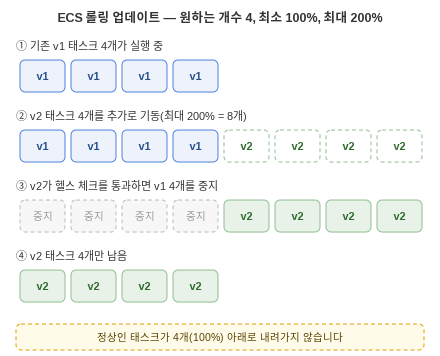
새 태스크가 계속 실패하면 배포가 끝나지 않고 태스크만 반복해서 교체됩니다. 이를 막는 기능이 배포 서킷 브레이커입니다. 서킷 브레이커 문서에 다음과 같이 있습니다.
The deployment circuit breaker has an option that will automatically roll back a failed deployment to the deployment that is in the COMPLETED state.
즉 서킷 브레이커가 배포 실패를 판단하면, 마지막으로 성공한(COMPLETED) 배포로 서비스를 롤백할 수 있습니다.
ECS의 블루/그린 — ECS 자체 기능과 CodeDeploy 연동
ECS에서도 블루/그린 배포를 할 수 있고, 방법은 두 가지입니다.
- ECS 자체 배포 전략: 서비스의 배포 전략을
BLUE_GREEN으로 지정합니다. API에는ROLLING,BLUE_GREEN,LINEAR,CANARY네 가지 전략이 있습니다. 블루/그린에서는 트래픽을 옮긴 뒤 두 버전을 함께 유지하는 베이크 시간(bake time) 과, 단계마다 Lambda 함수로 검증하는 수명 주기 훅을 설정할 수 있습니다. - CodeDeploy 연동: 서비스의 배포 컨트롤러를
CODE_DEPLOY로 지정하면 CodeDeploy가 배포를 맡습니다. 타깃 그룹 두 개를 구성하고 새 태스크 세트(그린)로 트래픽을 전환합니다.CodeDeployDefault.ECSCanary10Percent5Minutes(10%를 먼저 옮기고 5분 뒤 나머지 90%)처럼 트래픽을 나눠 전환하는 구성을 선택할 수 있습니다.
여기서 알 수 있듯이 ECS와 CodeDeploy는 서로 대체하는 관계만은 아닙니다. CodeDeploy는 EC2 서버, Lambda, ECS 세 곳에 배포할 수 있는 배포 도구이고, ECS는 컨테이너를 실행하는 오케스트레이터입니다. "ECS와 CodeDeploy 중 무엇을 사용할지"는 실제로는 "EC2 서버에 직접 설치할지, 컨테이너로 실행할지"의 선택입니다.
ECS에서는 서버 대신 태스크 정의(이미지와 자원)와 원하는 개수를 관리하고, 서비스가 그 개수를 유지하며 배포를 진행합니다.EKS + Argo CD — Git에 적은 상태로 클러스터를 맞추는 방식
EKS(Elastic Kubernetes Service) 는 AWS가 운영하는 쿠버네티스입니다. 쿠버네티스는 ECS와 같은 컨테이너 오케스트레이터이지만, AWS 전용이 아닌 오픈소스 표준이라 다른 클라우드나 온프레미스에서도 같은 매니페스트(YAML)로 운영할 수 있습니다.
- EKS가 관리하는 범위: 쿠버네티스의 컨트롤 플레인(API 서버, 스케줄러, etcd)을 AWS가 운영합니다. 파드가 실행될 노드는 관리형 노드 그룹, Fargate, EKS Auto Mode 중에서 선택하며, Auto Mode를 사용하면 노드 관리까지 AWS가 맡습니다.
- 비용: EKS 요금 페이지에 따르면 표준 지원 버전 기준으로 클러스터마다 시간당 0.10달러가 노드 비용과 별도로 청구됩니다. ECS는 클러스터 자체에 요금이 없습니다.
- 배포 단위: 쿠버네티스의 Deployment가 ECS 서비스에 해당합니다. 원하는 파드 수를 유지하고, 롤링 업데이트를 할 때는
maxSurge와maxUnavailable값(기본 각각 25%)으로 동시에 교체할 파드 수를 정합니다.
쿠버네티스의 기본 개념과 EKS를 실제 프로젝트에 적용한 과정은 쿠버네티스 기본기부터 실전 적용까지에서 자세히 정리했습니다.
Argo CD — 클러스터 안에서 Git을 지켜보는 배포 도구
쿠버네티스에 배포할 때 CI에서 kubectl apply를 실행할 수도 있습니다. 이 방식은 CI가 클러스터 관리자 권한을 가져야 하고, 누군가 클러스터에서 직접 리소스를 고치면 Git의 내용과 실제 상태가 달라집니다. Argo CD는 이 문제를 GitOps 방식으로 해결합니다. Argo CD 문서에 다음과 같이 있습니다.
Argo CD is implemented as a Kubernetes controller which continuously monitors running applications and compares the current, live state against the desired target state (as specified in the Git repo).
즉 Argo CD는 클러스터 안에서 실행되면서 Git에 적힌 상태와 클러스터의 실제 상태를 계속 비교합니다. 둘이 다르면 OutOfSync로 표시하고, 동기화(sync)하면 Git의 내용을 클러스터에 반영합니다.
- Application: "어느 Git 저장소의 어느 경로를 어느 클러스터, 네임스페이스에 반영할지"를 선언하는 리소스입니다.
- 자동 동기화:
syncPolicy.automated를 설정하면 Git이 바뀔 때 자동으로 반영합니다. 기본값에서는 클러스터를 직접 고친 변경을 되돌리지 않고, Git에서 삭제한 리소스도 클러스터에서 삭제하지 않습니다. 되돌리려면selfHeal: true, 삭제하려면prune: true를 켭니다. - 카나리, 블루/그린: Argo CD는 Git의 상태를 반영하는 도구이고, 트래픽을 단계적으로 전환하는 일은 Argo Rollouts 같은 별도 컨트롤러가 합니다.
apiVersion: argoproj.io/v1alpha1
kind: Application
metadata:
  name: order-api
  namespace: argocd
spec:
  source:
    repoURL: https://github.com/example/deploy-manifests.git
    path: order-api/prod
    targetRevision: main
  destination:
    server: https://kubernetes.default.svc
    namespace: order
  syncPolicy:
    automated:
      selfHeal: true   # 클러스터를 직접 고친 변경을 Git 상태로 되돌림
      prune: true      # Git에서 삭제한 리소스를 클러스터에서도 삭제
배포를 누가 시작하나 — 푸시와 풀
세 방식의 가장 큰 운영상 차이는 배포를 시작하는 주체입니다.
SVG 코드
<svg xmlns="http://www.w3.org/2000/svg" width="440" height="370" viewBox="0 0 440 370" font-family="-apple-system, 'Segoe UI', 'Noto Sans KR', sans-serif">
<defs><marker id="ah" viewBox="0 0 10 10" refX="9" refY="5" markerWidth="7" markerHeight="7" orient="auto-start-reverse"><path d="M0,0 L10,5 L0,10 z" fill="#888"/></marker></defs>
<rect x="0" y="0" width="440" height="370" fill="#FFFFFF"/>
<text x="220" y="22" font-size="13" fill="#333" text-anchor="middle" font-weight="bold">배포를 누가 시작하나 — 푸시와 풀</text>
<rect x="8" y="36" width="424" height="132" rx="8" fill="#FAFAFA" stroke="#DDDDDD"/>
<text x="20" y="56" font-size="11.5" fill="#7A5200" text-anchor="start" font-weight="bold">푸시 방식: EC2 + CodeDeploy, ECS</text>
<rect x="20" y="80" width="92" height="44" rx="6" fill="#FFFFFF" stroke="#999"/>
<text x="66" y="106" font-size="11.5" fill="#333" text-anchor="middle" font-weight="bold">CI</text>
<rect x="166" y="80" width="112" height="44" rx="6" fill="#FFF3E0" stroke="#E8C98F"/>
<text x="222" y="99" font-size="11" fill="#7A5200" text-anchor="middle" font-weight="bold">CodeDeploy</text>
<text x="222" y="114" font-size="10.5" fill="#7A5200" text-anchor="middle">또는 ECS</text>
<rect x="332" y="80" width="88" height="44" rx="6" fill="#FFFFFF" stroke="#999"/>
<text x="376" y="99" font-size="10.5" fill="#333" text-anchor="middle">EC2 서버</text>
<text x="376" y="114" font-size="10.5" fill="#333" text-anchor="middle">또는 태스크</text>
<line x1="112" y1="102" x2="164" y2="102" stroke="#888" stroke-width="1.2" marker-end="url(#ah)"/>
<text x="138" y="94" font-size="9.5" fill="#555" text-anchor="middle">배포 요청</text>
<line x1="278" y1="102" x2="330" y2="102" stroke="#888" stroke-width="1.2" marker-end="url(#ah)"/>
<text x="304" y="94" font-size="9.5" fill="#555" text-anchor="middle">교체</text>
<text x="220" y="152" font-size="10.5" fill="#555" text-anchor="middle">CI가 AWS 배포 권한을 갖고 배포를 직접 시작합니다</text>
<rect x="8" y="180" width="424" height="180" rx="8" fill="#FAFAFA" stroke="#DDDDDD"/>
<text x="20" y="200" font-size="11.5" fill="#9E3A57" text-anchor="start" font-weight="bold">풀 방식: EKS + Argo CD</text>
<rect x="20" y="224" width="92" height="44" rx="6" fill="#FFFFFF" stroke="#999"/>
<text x="66" y="250" font-size="11.5" fill="#333" text-anchor="middle" font-weight="bold">CI</text>
<rect x="150" y="224" width="100" height="44" rx="6" fill="#FFFFFF" stroke="#999"/>
<text x="200" y="243" font-size="10.5" fill="#333" text-anchor="middle" font-weight="bold">Git 저장소</text>
<text x="200" y="258" font-size="10" fill="#333" text-anchor="middle">(매니페스트)</text>
<line x1="112" y1="246" x2="148" y2="246" stroke="#888" stroke-width="1.2" marker-end="url(#ah)"/>
<text x="130" y="238" font-size="9.5" fill="#555" text-anchor="middle">커밋</text>
<rect x="284" y="212" width="140" height="112" rx="6" fill="#FFFFFF" stroke="#D06A86" stroke-dasharray="4 3"/>
<text x="354" y="228" font-size="10" fill="#9E3A57" text-anchor="middle">EKS 클러스터</text>
<rect x="298" y="236" width="112" height="32" rx="5" fill="#FCE4EC" stroke="#D06A86"/>
<text x="354" y="256" font-size="11" fill="#9E3A57" text-anchor="middle" font-weight="bold">Argo CD</text>
<line x1="298" y1="252" x2="252" y2="252" stroke="#888" stroke-width="1.2" marker-end="url(#ah)"/>
<text x="267" y="268" font-size="9.5" fill="#555" text-anchor="middle">읽고</text>
<text x="267" y="280" font-size="9.5" fill="#555" text-anchor="middle">비교</text>
<line x1="354" y1="268" x2="354" y2="288" stroke="#888" stroke-width="1.2" marker-end="url(#ah)"/>
<rect x="306" y="290" width="96" height="26" rx="5" fill="#FFFFFF" stroke="#999"/>
<text x="354" y="307" font-size="10.5" fill="#333" text-anchor="middle">파드 교체</text>
<text x="220" y="346" font-size="10.5" fill="#555" text-anchor="middle">CI는 Git에 커밋만 하고, 클러스터 권한은 Argo CD만 갖습니다</text>
</svg>
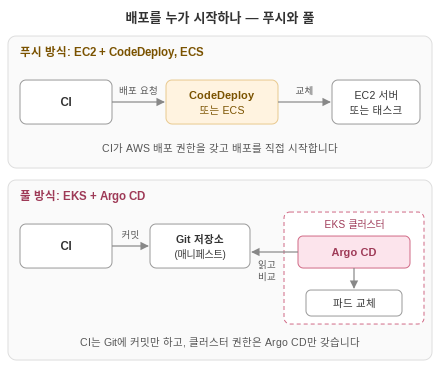
- 푸시 방식(CodeDeploy, ECS): CI가 AWS 배포 권한을 갖고
create-deployment나update-service를 호출합니다. 배포 기록은 CodeDeploy나 ECS의 배포 이력에 남습니다. - 풀 방식(Argo CD): CI는 Git에 커밋만 하고, 클러스터에 반영하는 권한은 클러스터 안의 Argo CD만 갖습니다. 배포 기록이 Git 커밋 이력이 되고, 롤백은
git revert커밋으로 합니다.
실무 예시 — order-api 1.4.0을 세 방식으로 배포하기
같은 변경(주문 API 1.4.0 배포)을 세 방식으로 진행하면 CI에서 실행하는 명령이 다음처럼 달라집니다. 저장소 이름과 계정 번호는 예시입니다.
EC2 + CodeDeploy: jar와 스크립트를 번들로 만들어 S3에 올리고 배포를 요청합니다.
./gradlew bootJar
aws deploy push --application-name order-api \
  --s3-location s3://example-deploy/order-api-1.4.0.zip --source .
aws deploy create-deployment --application-name order-api \
  --deployment-group-name prod \
  --deployment-config-name CodeDeployDefault.OneAtATime \
  --s3-location bucket=example-deploy,key=order-api-1.4.0.zip,bundleType=zip
ECS: 이미지를 ECR에 올리고, 새 태스크 정의 리비전으로 서비스를 갱신합니다.
docker build -t $ECR/order-api:1.4.0 . && docker push $ECR/order-api:1.4.0
aws ecs register-task-definition --cli-input-json file://taskdef.json   # → order-api:13
aws ecs update-service --cluster prod --service order-api \
  --task-definition order-api:13
EKS + Argo CD: 이미지를 ECR에 올리고, 매니페스트 저장소의 이미지 태그만 고쳐 커밋합니다. 클러스터 명령은 실행하지 않습니다.
docker build -t $ECR/order-api:1.4.0 . && docker push $ECR/order-api:1.4.0
cd deploy-manifests/order-api/prod
kustomize edit set image order-api=$ECR/order-api:1.4.0
git commit -am "order-api 1.4.0" && git push   # Argo CD가 감지해 반영
1.4.0에 문제가 있어 1.3.0으로 롤백할 때도 방법이 다릅니다.
| 방식 | 롤백 방법 | 롤백 과정 |
|---|---|---|
| EC2 + CodeDeploy | 1.3.0 번들로 새 배포를 만듭니다(배포 그룹의 자동 롤백을 활성화하면 실패 시 마지막 성공 리비전으로 다시 배포) | 서버마다 설치 과정을 다시 거칩니다 |
| ECS | 이전 태스크 정의 리비전(order-api:12)으로 서비스를 갱신합니다 | 이미지는 이미 있으므로 태스크만 교체합니다 |
| EKS + Argo CD | 이미지 태그를 고친 커밋을 git revert 합니다 | Argo CD가 되돌린 커밋을 반영합니다 |
세 방식 비교
| 항목 | EC2 + CodeDeploy | ECS | EKS + Argo CD |
|---|---|---|---|
| 배포 단위 | jar와 스크립트 번들 | 컨테이너 이미지와 태스크 정의 | 컨테이너 이미지와 매니페스트 |
| 실행 개수 유지 | Auto Scaling 그룹 | ECS 서비스 | 쿠버네티스 Deployment |
| 배포 시작 | CI가 배포 요청(푸시) | CI가 서비스 갱신(푸시) | Argo CD가 Git을 감지(풀) |
| 서버 관리 | OS, JDK, 에이전트까지 팀이 관리 | Fargate면 없음 | 노드 방식에 따라 다름 |
| 고정 비용 | 서버 비용 | 클러스터 요금 없음 | 클러스터마다 시간당 요금 |
| 학습 범위 | 리눅스, 셸 스크립트 | ECS 개념과 AWS 설정 | 쿠버네티스 전체와 Argo CD |
| 다른 환경으로 이전 | AMI와 스크립트를 다시 작성 | AWS 전용 | 매니페스트를 다른 쿠버네티스에서 재사용 |
어떤 방식을 선택할까
SVG 코드
<svg xmlns="http://www.w3.org/2000/svg" width="440" height="380" viewBox="0 0 440 380" font-family="-apple-system, 'Segoe UI', 'Noto Sans KR', sans-serif">
<defs><marker id="ah" viewBox="0 0 10 10" refX="9" refY="5" markerWidth="7" markerHeight="7" orient="auto-start-reverse"><path d="M0,0 L10,5 L0,10 z" fill="#888"/></marker></defs>
<rect x="0" y="0" width="440" height="380" fill="#FFFFFF"/>
<text x="220" y="22" font-size="13" fill="#333" text-anchor="middle" font-weight="bold">어떤 방식을 선택할까</text>
<rect x="16" y="44" width="264" height="46" rx="6" fill="#F7F7F7" stroke="#999"/>
<text x="148" y="64" font-size="11" fill="#333" text-anchor="middle">앱을 컨테이너 이미지로 만들 수 있나?</text>
<text x="148" y="80" font-size="10" fill="#666" text-anchor="middle">(OS 의존이 크거나 전환 여력이 없으면 N)</text>
<line x1="280" y1="67" x2="312" y2="67" stroke="#888" stroke-width="1.2" marker-end="url(#ah)"/>
<text x="296" y="61" font-size="10.5" fill="#555" text-anchor="middle" font-weight="bold">N</text>
<rect x="314" y="44" width="112" height="46" rx="6" fill="#FFF3E0" stroke="#E8C98F"/>
<text x="370.0" y="64" font-size="11" fill="#7A5200" text-anchor="middle" font-weight="bold">EC2 +</text>
<text x="370.0" y="80" font-size="10" fill="#7A5200" text-anchor="middle">CodeDeploy</text>
<line x1="148" y1="90" x2="148" y2="126" stroke="#888" stroke-width="1.2" marker-end="url(#ah)"/>
<text x="156" y="112" font-size="10.5" fill="#555" text-anchor="start" font-weight="bold">Y</text>
<rect x="16" y="128" width="264" height="46" rx="6" fill="#F7F7F7" stroke="#999"/>
<text x="148" y="148" font-size="11" fill="#333" text-anchor="middle">쿠버네티스 생태계가 필요한가?</text>
<text x="148" y="164" font-size="10" fill="#666" text-anchor="middle">(Helm 차트, 오퍼레이터, 멀티 클라우드)</text>
<line x1="280" y1="151" x2="312" y2="151" stroke="#888" stroke-width="1.2" marker-end="url(#ah)"/>
<text x="296" y="145" font-size="10.5" fill="#555" text-anchor="middle" font-weight="bold">Y</text>
<rect x="314" y="128" width="112" height="46" rx="6" fill="#FCE4EC" stroke="#D06A86"/>
<text x="370.0" y="148" font-size="11" fill="#9E3A57" text-anchor="middle" font-weight="bold">EKS +</text>
<text x="370.0" y="164" font-size="10" fill="#9E3A57" text-anchor="middle">Argo CD</text>
<line x1="148" y1="174" x2="148" y2="210" stroke="#888" stroke-width="1.2" marker-end="url(#ah)"/>
<text x="156" y="196" font-size="10.5" fill="#555" text-anchor="start" font-weight="bold">N</text>
<rect x="16" y="212" width="264" height="46" rx="6" fill="#F7F7F7" stroke="#999"/>
<text x="148" y="232" font-size="11" fill="#333" text-anchor="middle">서버(OS) 관리를 줄이고 싶은가?</text>
<text x="148" y="248" font-size="10" fill="#666" text-anchor="middle">(패치, 용량 계획을 AWS에 맡김)</text>
<line x1="280" y1="235" x2="312" y2="235" stroke="#888" stroke-width="1.2" marker-end="url(#ah)"/>
<text x="296" y="229" font-size="10.5" fill="#555" text-anchor="middle" font-weight="bold">Y</text>
<rect x="314" y="212" width="112" height="46" rx="6" fill="#EEF3FB" stroke="#4C7FE0"/>
<text x="370.0" y="232" font-size="11" fill="#26508F" text-anchor="middle" font-weight="bold">ECS +</text>
<text x="370.0" y="248" font-size="10" fill="#26508F" text-anchor="middle">Fargate</text>
<line x1="148" y1="258" x2="148" y2="294" stroke="#888" stroke-width="1.2" marker-end="url(#ah)"/>
<text x="156" y="280" font-size="10.5" fill="#555" text-anchor="start" font-weight="bold">N</text>
<rect x="16" y="296" width="264" height="46" rx="6" fill="#EEF3FB" stroke="#4C7FE0"/>
<text x="148.0" y="316" font-size="11" fill="#26508F" text-anchor="middle" font-weight="bold">ECS + EC2</text>
<text x="148.0" y="332" font-size="10" fill="#26508F" text-anchor="middle">(GPU, 특정 인스턴스 타입이 필요할 때)</text>
</svg>
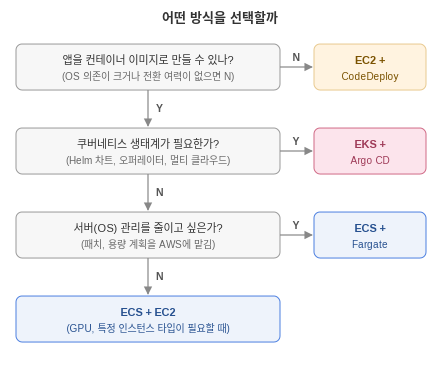
- 컨테이너로 만들 수 있는가: 서버에 설치된 소프트웨어에 크게 의존하거나 당장 컨테이너로 전환할 여력이 없으면 EC2 + CodeDeploy를 유지합니다. 블루/그린 배포를 사용하면 이 방식에서도 무중단 배포와 빠른 롤백이 가능합니다.
- 쿠버네티스가 꼭 필요한가: Helm 차트로 배포되는 오픈소스, 쿠버네티스 오퍼레이터(예: 데이터베이스나 Kafka 운영 도구), 여러 클라우드에서 같은 방식으로 운영해야 하는 요구가 있으면 EKS + Argo CD가 맞습니다. 대신 쿠버네티스를 운영할 수 있는 인력이 있어야 합니다.
- 그 밖에는 ECS: AWS 안에서 웹 서비스와 배치를 운영한다면 ECS가 배울 것이 가장 적습니다. 서버 관리를 줄이려면 Fargate, GPU나 특정 인스턴스 타입이 필요하면 EC2(또는 Managed Instances)에서 실행합니다.
정리
- EC2 + CodeDeploy는 서버에 파일을 설치합니다: 에이전트가 번들을 내려받고
appspec.yml의 스크립트를 수명 주기 이벤트마다 실행합니다. 서버 환경 관리도 팀이 합니다. - ECS는 태스크를 원하는 개수만큼 유지합니다: 태스크 정의 리비전을 바꿔 서비스를 갱신하면 롤링 업데이트나 블루/그린으로 교체되고, 서킷 브레이커가 실패한 배포를 롤백할 수 있습니다.
- CodeDeploy는 ECS의 배포 도구로도 쓰입니다: 두 서비스는 대체 관계만이 아니며, 실제 선택은 "서버에 설치할지, 컨테이너로 실행할지"입니다.
- EKS + Argo CD는 Git을 기준으로 클러스터를 맞춥니다: CI는 커밋만 하고, 클러스터 안의 Argo CD가 차이를 감지해 반영합니다. 쿠버네티스 생태계와 이식성을 얻는 대신 학습 범위와 클러스터 요금이 늘어납니다.
용어 한 줄 정리
| 용어 | 뜻 |
|---|---|
| 번들(리비전) | CodeDeploy가 배포하는 zip 파일. 앱 파일, 스크립트, appspec.yml이 들어 있습니다 |
appspec.yml | 파일 복사 위치와 수명 주기 이벤트별 스크립트를 적은 CodeDeploy 배포 명세 |
| 인플레이스 배포 | 기존 서버에 새 버전을 그대로 설치하는 배포 |
| 블루/그린 배포 | 새 환경(그린)을 만든 뒤 트래픽을 기존 환경(블루)에서 전환하는 배포 |
| 태스크 정의 | ECS 컨테이너의 이미지, CPU, 메모리, 포트, 환경 변수를 적은 설계도 |
| ECS 서비스 | 태스크를 원하는 개수만큼 유지하고 배포를 진행하는 ECS 리소스 |
| Fargate | 서버를 관리하지 않고 태스크(또는 파드)를 실행하는 AWS 실행 환경 |
| 배포 서킷 브레이커 | 실패한 ECS 배포를 멈추고 마지막 성공 배포로 되돌리는 기능 |
| 컨트롤 플레인 | 쿠버네티스의 API 서버, 스케줄러, etcd. EKS에서는 AWS가 운영합니다 |
| GitOps | Git에 적은 상태를 기준으로 실행 환경을 맞추는 운영 방식 |
OutOfSync | Argo CD에서 클러스터 상태가 Git과 다를 때의 표시 |