JPA 연관관계 즉시 로딩 — JPQL, QueryDSL, EntityGraph, Native, DTO로 하는 법과 착각


연관관계는 기본을 지연 로딩(LAZY) 으로 삼는 게 정석입니다. 그런데 특정 조회에서는 연관 엔티티를 그 쿼리에서 함께 가져와야 합니다(N+1, LazyInitializationException 방지). 문제는 "즉시 로딩"을 하는 방법이 접근 방식마다 다르고, 즉시 로딩될 거라 착각하기 쉬운 코드가 많다는 점입니다. 방법별로 코드와 실제 쿼리를 보며 정리합니다.
fetch로 연관 엔티티를 함께 영속화해야 로딩된다" 는 점입니다 — 그래서 방법마다 fetch join에 해당하는 장치를 명시적으로 지정해야 합니다.
예시 엔티티는 이렇게 정의합니다 — Order는 Member(다대일)와 OrderItem(일대다)을 LAZY 로 참조합니다.
@Entity
class Order {
    @Id @GeneratedValue Long id;

    @ManyToOne(fetch = FetchType.LAZY)
    @JoinColumn(name = "member_id")
    Member member;

    @OneToMany(mappedBy = "order", fetch = FetchType.LAZY)
    List<OrderItem> items = new ArrayList<>();
}
1. JPQL — join fetch
가장 표준적인 방법입니다. join fetch는 연관 엔티티를 같은 SELECT로 함께 조회해 영속화합니다.
// 단건 연관(다대일) — 한 쿼리로 member까지 로딩
@Query("select o from Order o join fetch o.member where o.id = :id")
Order findWithMember(@Param("id") Long id);
select o.*, m.* from orders o join member m on m.id = o.member_id where o.id = ?;
컬렉션(일대다)은 조인 때문에 행이 중복되니 distinct로 엔티티를 정리합니다.
@Query("select distinct o from Order o join fetch o.items where o.id = :id")
Order findWithItems(@Param("id") Long id);
컬렉션 fetch join의 두 제약
① 둘 이상의 컬렉션을 동시에 fetch join하면
MultipleBagFetchException이 발생합니다(카테시안 곱). 하나만 fetch join하고 나머지는@BatchSize/별도 조회로 해결합니다. ② 컬렉션 fetch join + 페이징은 DB가 아니라 메모리에서 페이징됩니다(로그에HHH000104경고). 페이징이 필요하면 컬렉션은 fetch join하지 말고@BatchSize나 2차 조회로 가져옵니다.
2. QueryDSL — .fetchJoin()
JPQL의 join fetch와 같은 동작을 타입 안전하게 표현합니다. join/leftJoin 뒤에 .fetchJoin()을 반드시 붙여야 로딩됩니다.
queryFactory
    .selectFrom(order)
    .join(order.member, member).fetchJoin()   // fetchJoin() 없으면 로딩 안 됨
    .where(order.id.eq(id))
    .fetchOne();
.fetchJoin()을 빼고 .join(order.member, member)만 사용하면, 조인은 되지만 member는 로딩되지 않고 접근 시 추가 쿼리가 실행됩니다 — 가장 흔한 실수입니다.
3. Spring Data JPA — @EntityGraph
쿼리 문자열 없이 어떤 연관관계를 함께 로딩할지 속성 경로로 지정합니다. 내부적으로 fetch join(LEFT OUTER JOIN)으로 동작합니다.
// 메서드 이름 쿼리에 그래프만 추가
@EntityGraph(attributePaths = {"member"})
Optional<Order> findById(Long id);

// @Query와 함께도 가능
@EntityGraph(attributePaths = {"member", "items"})
@Query("select o from Order o where o.id = :id")
Order findGraph(@Param("id") Long id);
페이징과 함께 쓰기 좋지만(단건 연관), 컬렉션을 그래프에 넣고 페이징하면 JPQL fetch join과 똑같이 메모리 페이징이 됩니다.
4. DTO 프로젝션 — 엔티티를 로딩하지 않고 "값만" 가져온다
필요한 필드만 DTO로 바로 뽑으면, 연관 데이터도 같은 쿼리의 조인으로 가져옵니다. 다만 이건 엄밀히는 연관 엔티티의 "즉시 로딩"이 아닙니다 — 엔티티와 프록시를 만들지 않고 스칼라 값을 선택할 뿐입니다.
// JPQL 생성자 표현식
@Query("select new com.example.OrderView(o.id, o.member.name) from Order o where o.id = :id")
OrderView findView(@Param("id") Long id);
// QueryDSL Projections
queryFactory
    .select(Projections.constructor(OrderView.class, order.id, order.member.name))
    .from(order).join(order.member, member)
    .fetchOne();
o.member.name은 조인으로 한 쿼리에 들어오지만, DTO에 담지 않은 다른 연관 필드는 존재하지 않습니다. 조회 전용 화면에는 이 방식이 가장 가볍고, 지연 로딩 문제 자체가 사라집니다.
5. 네이티브 쿼리 — fetch join이 되지 않는다
네이티브 SQL은 join fetch를 지원하지 않습니다. 조인을 걸어 조회해도 반환 엔티티의 연관관계는 여전히 프록시(지연) 라, 접근하면 추가 쿼리가 실행됩니다.
// member_id로 조인해도 order.member는 로딩되지 않는다
@Query(value = "select o.* from orders o join member m on m.id = o.member_id where o.id = :id",
       nativeQuery = true)
Order findNative(@Param("id") Long id);
연관까지 한 번에 채우려면 @SqlResultSetMapping으로 두 엔티티를 각각 매핑하거나(장황함), 애초에 DTO로 받는 편이 현실적입니다. 복잡한 연관 로딩이 목적이면 네이티브는 적합하지 않습니다.
// 두 엔티티를 함께 매핑 — 컬럼을 모두 선택하고 결과 매핑을 선언
@SqlResultSetMapping(
    name = "OrderWithMember",
    entities = {
        @EntityResult(entityClass = Order.class),
        @EntityResult(entityClass = Member.class)
    })
즉시 로딩으로 착각하기 쉬운 경우
① join만 하고 fetch를 빠뜨린다
// ✗ 조인은 되지만 member는 로딩 안 됨 → 접근 시 추가 쿼리
select o from Order o join o.member m where m.name = :name
// ✓ 함께 로딩하려면 fetch
select o from Order o join fetch o.member where o.member.name = :name
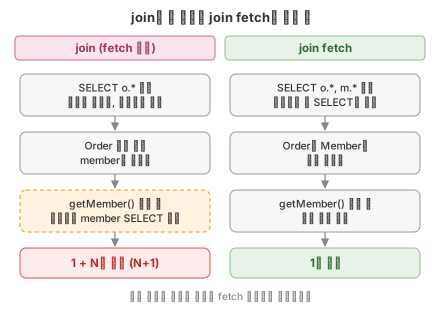
조인은 필터링, 정렬용이고, 로딩은 fetch가 있어야 합니다. 둘은 다릅니다.
주문 목록을 조회한 뒤 member에 접근할 때 두 쿼리의 실행 횟수는 다음과 같이 달라집니다.
SVG 코드
<svg xmlns="http://www.w3.org/2000/svg" width="440" height="312" viewBox="0 0 440 312" font-family="-apple-system, 'Segoe UI', 'Noto Sans KR', sans-serif">
<defs><marker id="ah" viewBox="0 0 10 10" refX="9" refY="5" markerWidth="7" markerHeight="7" orient="auto-start-reverse"><path d="M0,0 L10,5 L0,10 z" fill="#888"/></marker></defs>
<rect x="0" y="0" width="440" height="312" fill="#FFFFFF"/>
<text x="220.0" y="22" font-size="13" fill="#333" text-anchor="middle" font-weight="bold">join만 한 경우와 join fetch의 쿼리 수</text>
<rect x="15" y="36" width="200" height="24" rx="4" fill="#FCE4EC" stroke="#D06A86"/>
<text x="115" y="52" font-size="11.5" fill="#9E3A57" text-anchor="middle" font-weight="bold">join (fetch 없음)</text>
<rect x="20" y="74" width="190" height="42" rx="6" fill="#F7F7F7" stroke="#999999"/>
<text x="115" y="91.4" font-size="10.5" fill="#333" text-anchor="middle">SELECT o.* 실행</text>
<text x="115" y="105.9" font-size="10.5" fill="#333" text-anchor="middle">조인은 필터링, 정렬에만 사용</text>
<line x1="115" y1="116" x2="115" y2="130" stroke="#888" stroke-width="1.2" marker-end="url(#ah)"/>
<rect x="20" y="132" width="190" height="42" rx="6" fill="#F7F7F7" stroke="#999999"/>
<text x="115" y="149.4" font-size="10.5" fill="#333" text-anchor="middle">Order 목록 조회</text>
<text x="115" y="163.9" font-size="10.5" fill="#333" text-anchor="middle">member는 프록시</text>
<line x1="115" y1="174" x2="115" y2="188" stroke="#888" stroke-width="1.2" marker-end="url(#ah)"/>
<rect x="20" y="190" width="190" height="42" rx="6" fill="#FFF3E0" stroke="#E0A000" stroke-dasharray="4 3"/>
<text x="115" y="207.4" font-size="10.5" fill="#333" text-anchor="middle">getMember() 접근 시</text>
<text x="115" y="221.9" font-size="10.5" fill="#333" text-anchor="middle">주문마다 member SELECT 추가</text>
<line x1="115" y1="232" x2="115" y2="246" stroke="#888" stroke-width="1.2" marker-end="url(#ah)"/>
<rect x="20" y="248" width="190" height="30" rx="6" fill="#FDECEC" stroke="#D9534F"/>
<text x="115" y="267" font-size="11.5" fill="#B52B27" text-anchor="middle" font-weight="bold">1 + N번 쿼리 (N+1)</text>
<rect x="225" y="36" width="200" height="24" rx="4" fill="#E9F2E9" stroke="#8FBF8F"/>
<text x="325" y="52" font-size="11.5" fill="#2E6B2E" text-anchor="middle" font-weight="bold">join fetch</text>
<rect x="230" y="74" width="190" height="42" rx="6" fill="#F7F7F7" stroke="#999999"/>
<text x="325" y="91.4" font-size="10.5" fill="#333" text-anchor="middle">SELECT o.*, m.* 실행</text>
<text x="325" y="105.9" font-size="10.5" fill="#333" text-anchor="middle">연관까지 한 SELECT로 조회</text>
<line x1="325" y1="116" x2="325" y2="130" stroke="#888" stroke-width="1.2" marker-end="url(#ah)"/>
<rect x="230" y="132" width="190" height="42" rx="6" fill="#F7F7F7" stroke="#999999"/>
<text x="325" y="149.4" font-size="10.5" fill="#333" text-anchor="middle">Order와 Member를</text>
<text x="325" y="163.9" font-size="10.5" fill="#333" text-anchor="middle">함께 영속화</text>
<line x1="325" y1="174" x2="325" y2="188" stroke="#888" stroke-width="1.2" marker-end="url(#ah)"/>
<rect x="230" y="190" width="190" height="42" rx="6" fill="#F7F7F7" stroke="#999999"/>
<text x="325" y="207.4" font-size="10.5" fill="#333" text-anchor="middle">getMember() 접근 시</text>
<text x="325" y="221.9" font-size="10.5" fill="#333" text-anchor="middle">추가 쿼리 없음</text>
<line x1="325" y1="232" x2="325" y2="246" stroke="#888" stroke-width="1.2" marker-end="url(#ah)"/>
<rect x="230" y="248" width="190" height="30" rx="6" fill="#E9F2E9" stroke="#8FBF8F"/>
<text x="325" y="267" font-size="11.5" fill="#2E6B2E" text-anchor="middle" font-weight="bold">1번 쿼리</text>
<text x="220.0" y="300" font-size="10" fill="#888" text-anchor="middle">로딩 여부는 조인이 아니라 fetch 지정으로 결정됩니다</text>
</svg>
② FetchType.EAGER로 변경하면 JPQL도 한 번에 될 거라 생각한다
이게 가장 많이 속는 지점입니다. JPQL 쿼리는 매핑의 EAGER 설정을 무시합니다. join fetch가 없으면, JPQL로 Order를 가져온 뒤 EAGER 연관관계를 각각 별도 SELECT로 가져옵니다 — 즉 EAGER인데도 N+1이 발생합니다.
// Order.member가 EAGER여도,
@Query("select o from Order o")   // fetch join 없음
List<Order> findAll();
// 실행: Order 목록 1번 + member를 Order 수만큼 추가 SELECT (N+1)
EAGER는 "항상 로딩"일 뿐 "항상 한 쿼리"가 아닙니다. 한 쿼리로 묶는 건 오직 fetch join(또는 EntityGraph)뿐입니다 — 그래서 전역 EAGER는 N+1을 숨겨 오히려 권장되지 않습니다.
③ findById/findAll로 가져오면 연관관계도 채워진 줄 안다
LAZY면 findById가 돌려준 엔티티의 연관 필드는 프록시입니다. 트랜잭션 안에서 접근하면 그제야 추가 쿼리로 로딩되고, 트랜잭션 밖에서 접근하면 LazyInitializationException 이 발생합니다. "조회했으니 다 있겠지"가 가장 기본적인 착각입니다.
④ @Transactional 안에서 접근되니 "즉시 로딩"이라 여긴다
LAZY 연관을 트랜잭션 안에서 건드리면 LazyInitializationException 없이 값이 채워지긴 합니다. 그래서 "로딩됐다"고 여기기 쉽지만, 이건 접근하는 순간 추가 SELECT가 한 번 더 실행되는 지연 로딩이지 한 쿼리로 가져오는 즉시 로딩이 아닙니다.
@Transactional
public void report() {
    List<Order> orders = orderRepository.findAll();   // ① 주문 목록 조회 — SELECT 1번
    for (Order o : orders) {
        o.getMember().getName();   // ② 주문마다 member 조회 SELECT가 또 나감
    }
    // 주문이 100건이면 1(목록) + 100(member) = 101번 쿼리 → 이게 N+1
}
만약 트랜잭션 밖이었다면 ②에서 LazyInitializationException이 발생했을 겁니다. 트랜잭션 안이라 "되긴 되는" 것일 뿐, 쿼리 수는 그대로입니다 — 즉시 로딩이 아닙니다.
⑤ DTO로 뽑으면 엔티티처럼 전부 들어있는 줄 안다
DTO는 선택한 값만 가진 평범한 객체입니다. o.member.name만 선택했다면 member의 다른 필드나 다른 연관관계는 없습니다. 엔티티가 아니므로 이후 지연 로딩도 되지 않습니다(영속성 컨텍스트 밖).
방법 요약
다섯 가지 방법을 연관 데이터 조회 방식과 결과 객체 기준으로 비교하면 다음과 같습니다.
SVG 코드
<svg xmlns="http://www.w3.org/2000/svg" width="440" height="266" viewBox="0 0 440 266" font-family="-apple-system, 'Segoe UI', 'Noto Sans KR', sans-serif">
<defs><marker id="ah" viewBox="0 0 10 10" refX="9" refY="5" markerWidth="7" markerHeight="7" orient="auto-start-reverse"><path d="M0,0 L10,5 L0,10 z" fill="#888"/></marker></defs>
<rect x="0" y="0" width="440" height="266" fill="#FFFFFF"/>
<text x="220.0" y="22" font-size="13" fill="#333" text-anchor="middle" font-weight="bold">방법별 연관 로딩과 결과 형태</text>
<rect x="9" y="36" width="126" height="26" rx="4" fill="#EEF3FB" stroke="#4C7FE0"/>
<text x="72.0" y="53" font-size="11" fill="#26508F" text-anchor="middle" font-weight="bold">방법</text>
<rect x="137" y="36" width="148" height="26" rx="4" fill="#EEF3FB" stroke="#4C7FE0"/>
<text x="211.0" y="53" font-size="11" fill="#26508F" text-anchor="middle" font-weight="bold">연관 데이터 조회</text>
<rect x="287" y="36" width="144" height="26" rx="4" fill="#EEF3FB" stroke="#4C7FE0"/>
<text x="359.0" y="53" font-size="11" fill="#26508F" text-anchor="middle" font-weight="bold">결과 객체</text>
<rect x="9" y="68" width="126" height="30" rx="4" fill="#F7F7F7" stroke="#999999"/>
<text x="72.0" y="87" font-size="10.5" fill="#333" text-anchor="middle" font-weight="bold">JPQL join fetch</text>
<rect x="137" y="68" width="148" height="30" rx="4" fill="#E9F2E9" stroke="#8FBF8F"/>
<text x="211.0" y="87" font-size="10.5" fill="#2E6B2E" text-anchor="middle">같은 SELECT로 로딩</text>
<rect x="287" y="68" width="144" height="30" rx="4" fill="#E9F2E9" stroke="#8FBF8F"/>
<text x="359.0" y="87" font-size="10.5" fill="#2E6B2E" text-anchor="middle">영속 엔티티</text>
<rect x="9" y="102" width="126" height="30" rx="4" fill="#F7F7F7" stroke="#999999"/>
<text x="72.0" y="121" font-size="10.5" fill="#333" text-anchor="middle" font-weight="bold">QueryDSL .fetchJoin()</text>
<rect x="137" y="102" width="148" height="30" rx="4" fill="#E9F2E9" stroke="#8FBF8F"/>
<text x="211.0" y="121" font-size="10.5" fill="#2E6B2E" text-anchor="middle">같은 SELECT로 로딩</text>
<rect x="287" y="102" width="144" height="30" rx="4" fill="#E9F2E9" stroke="#8FBF8F"/>
<text x="359.0" y="121" font-size="10.5" fill="#2E6B2E" text-anchor="middle">영속 엔티티</text>
<rect x="9" y="136" width="126" height="30" rx="4" fill="#F7F7F7" stroke="#999999"/>
<text x="72.0" y="155" font-size="10.5" fill="#333" text-anchor="middle" font-weight="bold">@EntityGraph</text>
<rect x="137" y="136" width="148" height="30" rx="4" fill="#E9F2E9" stroke="#8FBF8F"/>
<text x="211.0" y="155" font-size="10.5" fill="#2E6B2E" text-anchor="middle">같은 SELECT로 로딩</text>
<rect x="287" y="136" width="144" height="30" rx="4" fill="#E9F2E9" stroke="#8FBF8F"/>
<text x="359.0" y="155" font-size="10.5" fill="#2E6B2E" text-anchor="middle">영속 엔티티</text>
<rect x="9" y="170" width="126" height="30" rx="4" fill="#F7F7F7" stroke="#999999"/>
<text x="72.0" y="189" font-size="10.5" fill="#333" text-anchor="middle" font-weight="bold">DTO 프로젝션</text>
<rect x="137" y="170" width="148" height="30" rx="4" fill="#FFF3E0" stroke="#E0A000"/>
<text x="211.0" y="189" font-size="10.5" fill="#8A6400" text-anchor="middle">같은 SELECT, 값만</text>
<rect x="287" y="170" width="144" height="30" rx="4" fill="#FFF3E0" stroke="#E0A000"/>
<text x="359.0" y="189" font-size="10.5" fill="#8A6400" text-anchor="middle">DTO (엔티티 아님)</text>
<rect x="9" y="204" width="126" height="30" rx="4" fill="#F7F7F7" stroke="#999999"/>
<text x="72.0" y="223" font-size="10.5" fill="#333" text-anchor="middle" font-weight="bold">네이티브 쿼리</text>
<rect x="137" y="204" width="148" height="30" rx="4" fill="#FCE4EC" stroke="#D06A86"/>
<text x="211.0" y="223" font-size="10.5" fill="#9E3A57" text-anchor="middle">로딩되지 않음 (프록시)</text>
<rect x="287" y="204" width="144" height="30" rx="4" fill="#E9F2E9" stroke="#8FBF8F"/>
<text x="359.0" y="223" font-size="10.5" fill="#2E6B2E" text-anchor="middle">영속 엔티티</text>
<rect x="4" y="66" width="432" height="102" rx="6" fill="none" stroke="#E0A000" stroke-dasharray="5 4"/>
<text x="220.0" y="254" font-size="10" fill="#888" text-anchor="middle">점선 안 세 가지가 한 쿼리로 엔티티까지 채우는 즉시 로딩입니다</text>
</svg>
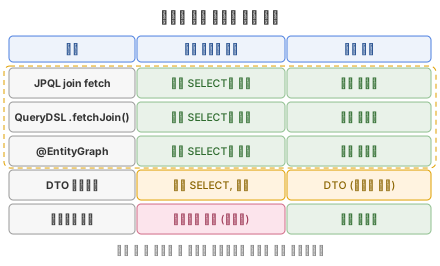
| 방법 | 즉시 로딩 장치 | 비고 |
|---|---|---|
| JPQL | join fetch | 컬렉션은 distinct, 다중 컬렉션, 페이징 주의 |
| QueryDSL | .fetchJoin() | 빠뜨리면 조인만 되고 로딩되지 않음 |
@EntityGraph | attributePaths | 쿼리 없이 그래프 지정, 컬렉션+페이징은 메모리 페이징 |
| DTO 프로젝션 | 조인 + 값 선택 | 엔티티 로딩이 아님(값만), 조회 전용에 최적 |
| 네이티브 쿼리 | (fetch join 불가) | @SqlResultSetMapping 또는 DTO로 우회 |
정리
- 기본은 LAZY, 즉시 로딩은 조회할 때마다
join fetch,.fetchJoin(),@EntityGraph중 하나를 명시해야 합니다. - JPQL
join fetch/ QueryDSL.fetchJoin()/@EntityGraph가 실제 "한 쿼리 즉시 로딩"입니다. - DTO 프로젝션은 값만 가져오는 것이라 지연 로딩 문제 자체가 없지만, 엔티티는 아닙니다.
- 네이티브 쿼리는 fetch join이 되지 않아, 연관 로딩에는 적합하지 않습니다.
- 자주 하는 착각:
join과join fetch는 다릅니다 —fetch가 있어야 로딩됩니다.EAGER로 변경해도 JPQL은 fetch join이 없으면 N+1입니다.findById가 돌려준 엔티티의 연관은 프록시입니다(트랜잭션 밖이면 예외).- 트랜잭션 안에서 LAZY 연관에 접근하면 예외 없이 되긴 하지만, 즉시 로딩이 아니라 접근할 때마다 실행되는 추가 쿼리(N+1)입니다.